



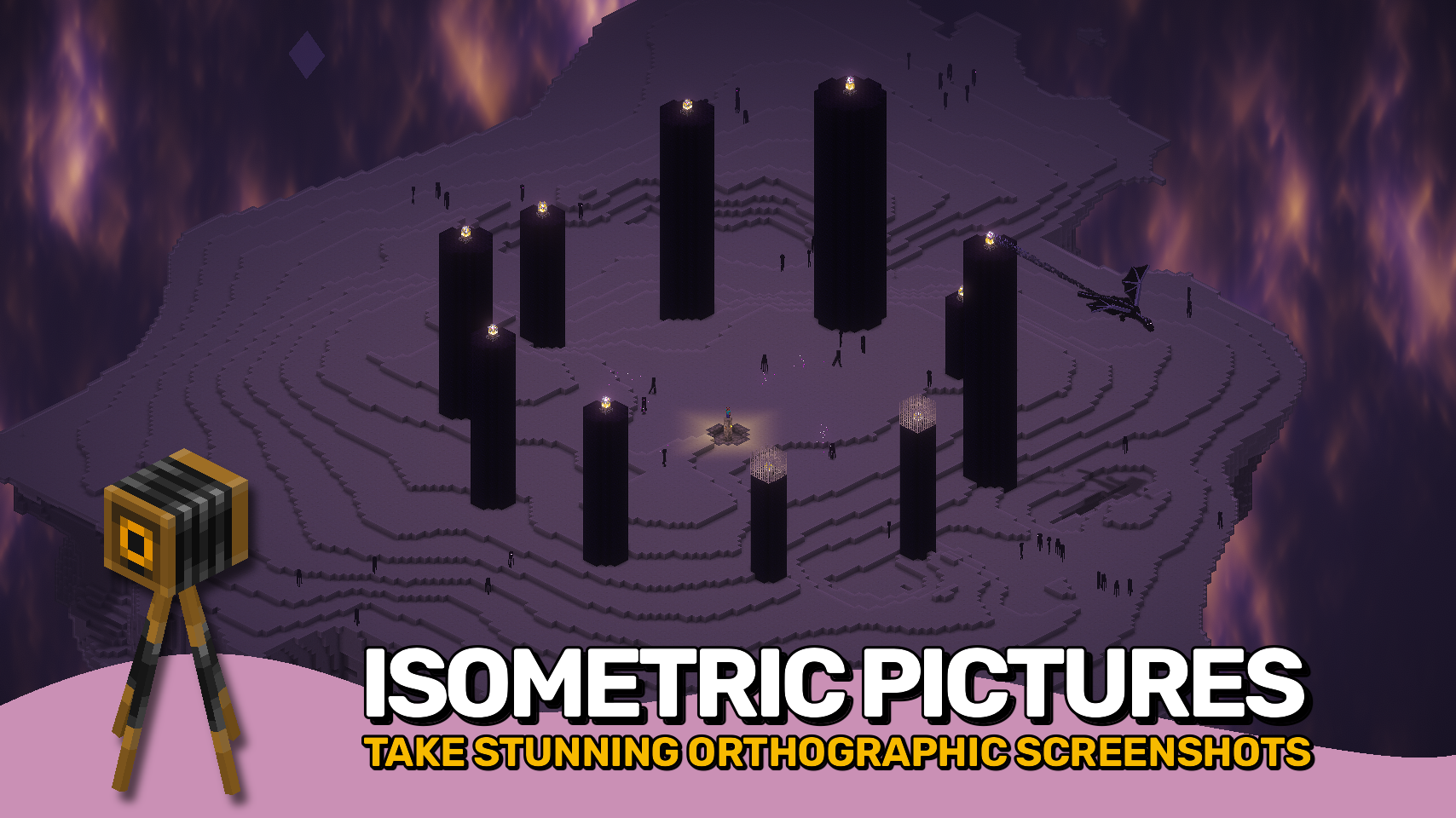
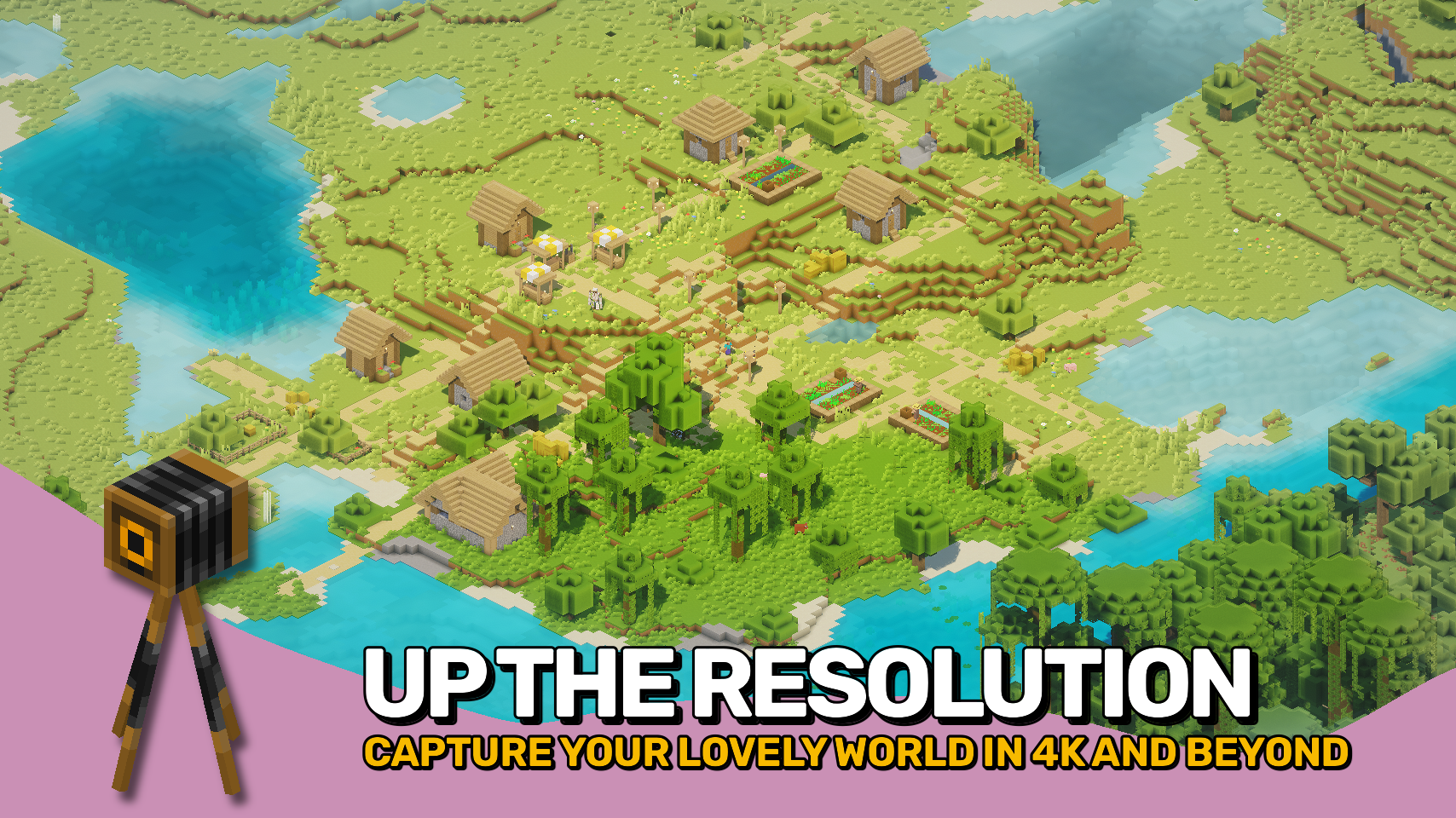
Pixelshot 为 Minecraft 带来了强大的摄影工具,让你能够以令人惊叹的全新方式轻松捕捉你的世界。它配备可调整的平行投影相机,提供流畅的等距视角;支持高分辨率截图模式,可生成高达 16K 的超清晰图像;还提供全景拍摄功能,用于为主菜单屏幕创建完整的 360° 背景。
借助其内置的平行投影相机,你可以将镜头拉远至玩家角色之外,从全新的角度俯瞰整个世界。非常适合展示建筑作品、制作地图以及拍摄电影感镜头。通过简单的菜单或快捷按键即可轻松调整缩放、旋转和视角设置,实现流畅的控制体验。
无论你是想炫耀庞大的建筑杰作、截取完美的壁纸,还是设计属于自己的主菜单背景,这个模组都能让每一张照片都呈现出绝对惊艳的效果。

- ? 平行投影相机: 以干净利落的等距视角捕捉你的世界。
- ? 可调节缩放与角度: 通过菜单或快捷按键微调你的视角。
- ? 高分辨率截图: 拍摄高达 16K 的清晰图像,展现惊人细节。
- ? 全景拍摄: 捕获完整的 360° 视角,用作自定义的主菜单背景。
- ⌨️ 简易控制: 使用平滑的预设按键即时切换视角或缩放级别。
- ? 更佳协同: 可与 Freecam 模组(由 hashalite 开发)完美配合,实现自由相机移动。
- ⚙️ 与 Sodium 配合使用: 请禁用 Use Block Face Culling 以获得最佳视觉效果。


⏩ 客户端必须安装
⏩ 需要安装 PUZZLES LIB(Fabric & NeoForge)
⏩ 需要安装 FABRIC API(Fabric)
⏩ 需要安装 FORGE CONFIG API PORT(NeoForge)

如果模组支持配置,可以直接通过游戏内的模组菜单进行设置(Fabric 端需安装由 Prospector 开发的 Mod Menu)。
若使用外部文本编辑器进行手动配置,所有配置文件均位于 .minecraft/config 目录下,文件名为 MOD_ID-client.toml、MOD_ID-common.toml 或 MOD_ID-server.toml,具体取决于配置文件的类型。并非所有类型的配置文件都会存在,甚至可能完全不存在。

? 衷心感谢 BarracudaATA 带来的精彩 Mineshot 模组,它在我多年前开启 Minecraft 模组制作之旅时给予了最初的灵感。尽管本项目已从头重构,但 Mineshot 依然是其核心灵感来源。
? 特别感谢 pascallj 通过 Mineshot Revived 让 Mineshot 焕发新生,保留了原版的精神风貌,并激励我创作出完全现代化的版本。
 |
 |
|
 |
 |
|
 |
 |
|
 |
 |
|
 |
 |

© 2026 @heyitsfuzs. All rights reserved. This page was last edited on 11 September 2026, at 06:44 (UTC).
Pixelshot brings powerful camera tools to Minecraft, making it easy to capture your world in amazing new ways. It features an adjustable orthographic camera for smooth isometric views, a high-resolution screenshot mode for ultra-clear images up to 16K, and panoramic capture for creating full 360° backgrounds for your main menu screen.
With its built-in orthographic camera, you can zoom far away from your player and see the world from a whole new angle. Perfect for building showcases, maps, and cinematic shots. Easily adjust zoom, rotation, and view settings through a simple menu or use quick keybinds for smooth control.
Whether you want to show off a massive build, capture a perfect wallpaper, or design your own menu background, this mod makes every shot look absolutely stunning.
- ? Orthographic Camera: Capture your world with a clean, isometric view.
- ? Adjustable Zoom and Angle: Fine-tune your perspective through the menu or quick keybinds.
- ? High-Resolution Screenshots: Take crystal-clear images up to 16K for amazing detail.
- ? Panoramic Shots: Capture full 360° views to use as your custom main menu background.
- ⌨️ Easy Controls: Switch angles or zoom levels instantly with smooth preset keys.
- ? Even Better Together: Works perfectly with the Freecam mod by hashalite for free camera movement.
- ⚙️ Using with Sodium: Disable Use Block Face Culling for best visuals.
⏩ INSTALLATION REQUIRED ON CLIENT
⏩ REQUIRES PUZZLES LIB TO BE INSTALLED (FABRIC & NEOFORGE)
⏩ REQUIRES FABRIC API TO BE INSTALLED (FABRIC)
⏩ REQUIRES FORGE CONFIG API PORT TO BE INSTALLED (FABRIC)
If available for a mod, configuration is possible directly from in-game using the mod menu (requires Mod Menu by Prospector to be installed on Fabric).
For manual configuration using an external text editor all files are found at .minecraft/config, named as MOD_ID-client.toml, MOD_ID-common.toml, or MOD_ID-server.toml, depending on the type of config. Not all types might exist for a mod, if any at all.
? Massive thanks to BarracudaATA for their amazing Mineshot mod, which first inspired my journey into Minecraft modding many years ago. While this project has been rebuilt from the ground up, Mineshot remains the core inspiration behind it.
? Huge thanks to pascallj for keeping Mineshot alive with Mineshot Revived, which kept the spirit of the original going and inspired me to create a fully modern version of my own.
|
|
|
|
|
|
|
|
|
|
|
|
|
|
© 2026 @heyitsfuzs. All rights reserved. This page was last edited on 11 September 2026, at 06:44 (UTC).

下载 Pixelshot
下载 Pixelshot
下载 Pixelshot
下载 Pixelshot
下载 Pixelshot
下载 Pixelshot
下载 Pixelshot
下载 Pixelshot
需要联机服务器吗?
稳定流畅、一键部署,几分钟即可和朋友联机开服
最低仅需 8 元/月 即可畅快联机
下载 Pixelshot
需要联机服务器吗?
稳定流畅、一键部署,几分钟即可和朋友联机开服
最低仅需 8 元/月 即可畅快联机
下载 Pixelshot
需要联机服务器吗?
稳定流畅、一键部署,几分钟即可和朋友联机开服
最低仅需 8 元/月 即可畅快联机
更新日志
本项目所有值得注意的更改都将记录在此文件中。
格式遵循 Keep a Changelog, 并且本项目遵守 语义化版本控制。
[v26.3.0-mc26.3.x] - 2026-09-20
变更
- 更新到 Minecraft 26.3.x
关于这个资源的讨论、问题反馈与使用心得
还没有讨论,来发第一帖吧
你是这个资源的作者?登录后可认领此资源。
相似资源
 模组

显示你正在注视的方块的信息。(适用于 Minecraft 1.16+ 的 Hwyla/Waila 分支)
 模组

查看物品与配方
 模组
在游戏画面角落显示附近世界地形、玩家、生物和实体的地图。可创建路径点,帮助你找到标记过的位置。
 模组
使用 JavaScript 编辑配方、添加自定义物品、编写世界事件!
 模组
添加区块认领和玩家组队功能,并与 Xaero's Minimap 和 World Map 集成
 模组
添加全屏世界地图,显示你在世界中已探索的区域。与 Xaero's Minimap 搭配使用效果极佳。
评论 0
登录后参与评分
还没有评论,来抢沙发吧