
SGrave 已停止维护!
请改用 HyperGrave,这是一个更优秀、功能大幅改进的墓碑数据包。

使用该数据包(同时也打包为模组)后,你的物品不再只是从背包中掉落出来,而是全部存储在一个名为 grave(墓碑)的安全位置。
虽然有许多模组和数据包具备此功能,但本数据包拥有更多的特性、更高的质量以及更强的可定制性。
需要 Sul4ur's global resource pack。
(如果你使用的是模组版本,则不需要)
特性
- 完全免费!
- 高度可定制!
- 支持多人游戏!
注意事项
-
请确保以下游戏规则已设置:
- KeepInventory: true
- doImmediateRespawn: false
-
此数据包可能与 Spigot、PaperMC 等插件加载器不兼容。
-
此数据包同时提供 模组版本。
- 它本质上是将数据包打包成了模组形式。
- 如果你使用模组版本,则无需安装所需的资源包。
墓碑生成
你的墓碑不会仅仅在你死亡的确切位置生成。生成墓碑需要满足一些条件。 基本上,墓碑会尝试寻找最近的一个透明方块,且该方块下方必须有实心方块。
墓碑通常具有无敌属性。它们也没有碰撞箱,这意味着你可以轻松穿过墓碑。此外,墓碑默认会发光,因此即使隔着墙也能看到它们。默认情况下,墓碑会在 90 分钟后消失。
墓碑生成后,系统会向你广播墓碑的确切位置。广播信息大致如下:

注意 Grave #9 中的 9。这是墓碑 ID,非常重要。请记住这一点;它在许多场景下都非常有用。
注意: 如果此处未显示墓碑 ID 或玩家名称,请立即报告此问题。
打开墓碑
当你到达墓碑所在位置时,你会看到自己的头颅躺在地上,旁边有一个文本显示板,上面显示你的名字、墓碑 ID 以及墓碑的外观设计。

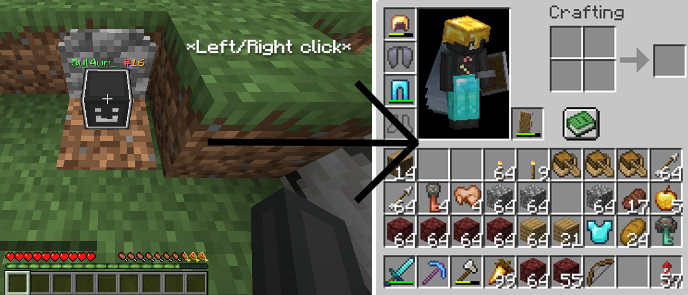
你可以点击墓碑来打开它。所有物品将恢复到死亡前的确切位置,并且你将回收死亡前经验的 90%。如果有物品无法放入你的背包,它将会被掉落出来。
你也可以通过“潜行 + 左键点击”来“破坏墓碑”,此时所有物品将直接掉落。
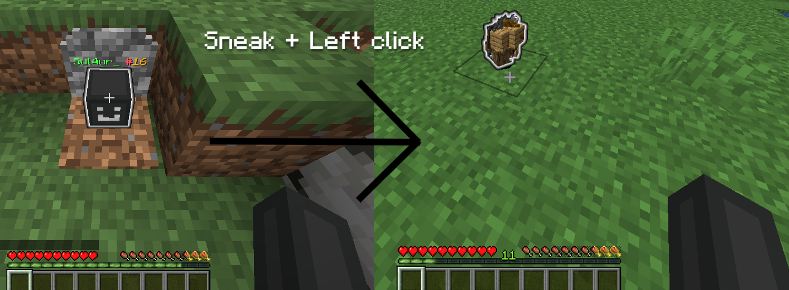
从被破坏的墓碑中掉落的物品具有无敌属性,不会被熔岩或爆炸等事物摧毁,并且这些物品会在 45 分钟后消失。(可在配置文件中修改)
物品默认会发光。
管理员模式
如果玩家拥有命令权限,他们可以通过进入配置文件(稍后我会展示操作方法),然后翻到第 2 页来启用管理员模式。 启用管理员模式的玩家可以执行多种操作,例如从墓碑备份中恢复物品,以及无视配置文件的限制查看所有关于墓碑的信息。
命令
/trigger sgrave.help (旧版本不存在此命令)
如果你在数据包使用中遇到任何问题或疑问,请使用此命令。
/trigger sgrave set <value>
向你发送当前墓碑的坐标。
将值设置为 1 以定位你最后的墓碑。
将值设置为 2 以定位你倒数第二个墓碑。
将值设置为 3 以定位你倒数第三个墓碑。
以此类推...
任何玩家(非 OP 和 OP)均可使用此命令。
/trigger sgrave.grave_info set <value>
显示指定 ID 的墓碑信息。它会展示墓碑的详细信息,包括内部存储的物品和经验值、位置、创建时间、消失时间等。你还可以查看其他玩家的墓碑信息以及被破坏的墓碑信息。
例如,要显示 #4 号墓碑的信息,请使用
/trigger sgrave.grave_info set 4。任何玩家(非 OP 和 OP)均可使用此命令。
/trigger sgrave.recover_items set <value>
从备份中恢复你的物品。将 <value> 替换为你想要恢复物品的墓碑 ID。
只有启用了管理员模式的玩家才能使用此命令。
/trigger sgrave.give_key
给予你一个墓碑钥匙。它可以用来打开任何人的墓碑,即使 Robbing(抢劫)设置为 false。
只有启用了管理员模式的玩家才能使用此命令。
/function sul4ur:sgrave/config
打开配置菜单。仅限 OP 使用。
/function sul4ur:sgrave/clean_uninstall
卸载此数据包。仅限 OP 使用。
注意: 请勿运行任何以 sgrave: 开头的函数,因为它们都是内部函数,使用它们可能会导致不良后果。如果是以 sul4ur:sgrave/ 开头,则可以安全运行。
常见问题
为什么皮肤头部显示的是默认皮肤,与我的不一致?
需要满足以下条件,皮肤头部才能正确显示你的形象:
- 你必须拥有良好的网络连接。
- 你必须使用非盗版(正版)的 Minecraft 启动器。
- 你不能使用 PaperMC、Spigot、Bukkit 或任何插件加载器。这些服务端以破坏部分数据包而闻名。
为什么头部前方有一个巨大的蓝色物体?
这是因为你没有安装所需的资源包。如果你使用的是模组版本,则不应出现此问题。
为什么点击坟墓没有任何反应?
该坟墓数据包可能与 Paper、Spigot、Bukkit 等不兼容。如果你使用了其中任何一种,那可能就是原因所在。
当我尝试点击坟墓时,我的手突然消失了一瞬间,现在再点击坟墓没有任何反应。
这是由于 Carry On 模组的一个问题引起的。
要修复此问题,请按 F3+B,寻找一个白色的小盒子,按住 Shift + 右键将其放置在下方的坟墓上,然后再次按 F3+B。
为什么头部前方有一个巨大的蓝色物体?
这是因为你没有安装所需的资源包。如果你使用的是模组版本,则不应出现此问题。
报告错误和提出功能建议!
 |
如果你发现了错误,请在此处报告。
如果你有让数据包变得更好的酷炫想法,也请在这里提交。 |
加入我们的 Discord!
| 如果你有任何问题,或遇到数据包相关的任何问题等...,欢迎加入我们的 Discord 服务器!如果你无法在 GitHub 上操作,也可以在这里报告错误和提出功能建议。
|
许可证
SGrave has been discontinued!
Use HyperGrave instead, which is a better and much more improved grave data pack.
With this data pack (which is also packaged as a mod), instead of just yeeting your items out of your inventory, all of them will be stored inside a safe place called grave.
There are many mods and data packs that do this, but this one has way more features, has much higher quality and is more customizable.
Requires Sul4ur's global resource pack.
(Not if you're using the mod version)
Features
- Completely free!
- Highly customizable!
- Multiplayer-friendly!
Notes
-
Make sure the following gamerules are set:
- KeepInventory: true
- doImmediateRespawn: false
-
This data pack might not be compatible with plugin loaders like Spigot, PaperMC, etc.
-
This data pack also has a mod version.
- It's basically the data pack but packaged as a mod.
- If you're using the mod version, you won't need the required resource pack.
Grave Spawning
Your grave won't just spawn exactly where you died. There are a few conditions for a grave being made. Basically, your grave will try to find the nearest transparent block where there is a solid block below.
Graves are mostly invulnerable. They also have no hitbox, meaning you can easily walk through graves. Also, graves glow, so you can see them through walls. By default, graves despawn in 90 minutes.
After a grave spawns, The exact location of your grave will be announced to you. The announcement should look something like this:
Notice the 9 in Grave #9. That is the grave ID, and it's important. Keep that in mind; it can be useful in a lot of scenarios.
Note: If either the grave ID or the player's name doesn't appear here, make sure to report it immediately.
Opening a Grave
When you reach the location of your grave, you will see your head lying on the ground, along with a text display showing your name and your grave's ID, along with the grave design.
You can click on the grave to open he grave. All the items will be put in the exact same spot they were before you died, and you will collet 90% of the experience you've had before you died. If an item can't be put in your inventory, it will instead be dropped.
You can also "break a grave" by sneak + left clicking, where all items will just drop.
The items that are dropped from a grave being broken are invulnerable and can't be destroyed by things such as lava or explosions, and they take 45min to despawn. (Can be changed in the config.)
The items glow by default.
Admin mode
If a player has access to commands, they can enable admin mode by going into the configs (I'll show you how to do that), then to page 2. A player with admin mode can do many things like recovering from a grave backup and viewing all information about graves regardless of what is set in the configs.
Commands
/trigger sgrave.help (Does not exist on older versions)
This is the command you should use if you have any problems with or questions about this data pack.
/trigger sgrave set <value>
Sends the coordinates of your grave to you.
Set the value to 1 to locate your last grave.
Set the value to 2 to locate your second last grave.
Set the value to 3 to locate your third last grave.
and so on...
Any players (non-OPs and OPs) can use this command.
/trigger sgrave.grave_info set <value>
Shows info about the grave with the ID of the value you entered. It shows a full detail of the grave, including the items and experience stored inside, the location, creation time, despawn time, etc. You can also view others' grave info and information about broken graves as well.
For example to show information about grave #4, use
/trigger sgrave.grave_info set 4. Any players (non-OPs and OPs) can use this command.
/trigger sgrave.recover_items set <value>
Recovers your items from a backup. Replace <value> with the grave ID you want to recover from.
Only players with Admin mode enabled can use this command.
/trigger sgrave.give_key
Gives you a grave key. It can be used to open anybody's graves, even if Robbing is set to false.
Only players with Admin mode enabled can use this command.
/function sul4ur:sgrave/config
Opens the config menu. Only OPs can use this command.
/function sul4ur:sgrave/clean_uninstall
Uninstalls this data pack. Only Ops can use this command.
Note: Make sure you do not run any functions that start with sgrave:, since they are all internal functions and using them can have bad consequences. If it starts with sul4ur:sgrave/, then you can run them safely.
FAQ
Why does the head of the skin show a default skin and is not the same as mine?
These criterions must be met so that the head of the skin can show yours:
- You must have a good internet connection.
- You must be using a non-cracked Minecraft launcher.
- You must not be using PaperMC, Spigot, Bukkit or any plugin loader. These are famous for breaking some data packs.
Why is there a big blue thing right in front of the head?
This is because you're not using the required resource pack. This shouldn't happen if you're using the MOD version.
Why does clicking on the grave do nothing?
This grave data pack might not be compatible with Paper, Spigot, Bukkit, etc. If you're using any of these, then that might be the reason.
When I tried to click on the grave, my hand suddenly disappeared for a moment and now when I click on the grave it does nothing.
This is because of an issue with the Carry On mod.
To fix this, press F3+B, look for a white mini-box, use shift + right click, place it down right on the grave and then press F3+B again.
Why is there a big blue thing right in front of the head?
This is because you're not using the required resource pack. This shouldn't happen if you're using the MOD version.
Report bugs and suggest features!
|
If you found a bug, this is where you should report it.
Also if you came up with a cool idea that makes the data pack better, this is where you should go. |
Join us on discord!
| If you have any questions, any problems with the data pack, etc..., you can join our Discord server! You can also report bugs and suggest features here if you can't do it on github.
|
License
License
This work is licensed under CC BY-NC-ND.

One exception is made for video content, which can be monetized. However, you must give appropriate credit in the description of your video.

下载 SGrave
需要联机服务器吗?
稳定流畅、一键部署,几分钟即可和朋友联机开服
最低仅需 8 元/月 即可畅快联机
下载 SGrave
下载 SGrave
需要联机服务器吗?
稳定流畅、一键部署,几分钟即可和朋友联机开服
最低仅需 8 元/月 即可畅快联机
下载 SGrave
需要联机服务器吗?
稳定流畅、一键部署,几分钟即可和朋友联机开服
最低仅需 8 元/月 即可畅快联机
下载 SGrave
需要联机服务器吗?
稳定流畅、一键部署,几分钟即可和朋友联机开服
最低仅需 8 元/月 即可畅快联机
下载 SGrave
需要联机服务器吗?
稳定流畅、一键部署,几分钟即可和朋友联机开服
最低仅需 8 元/月 即可畅快联机
下载 SGrave
需要联机服务器吗?
稳定流畅、一键部署,几分钟即可和朋友联机开服
最低仅需 8 元/月 即可畅快联机
下载 SGrave
下载 SGrave
需要联机服务器吗?
稳定流畅、一键部署,几分钟即可和朋友联机开服
最低仅需 8 元/月 即可畅快联机
下载 SGrave
只是一个小热修复!哦对了,还新增了对 1.21.11 的支持!
新增
- 新增对 1.21.11 的支持
更改
- Glowing Graves 和 Glowing Head 配置不再与墓穴同步。
- 这意味着它们仅应用于新创建的墓穴,不再适用于已有的墓穴。
- 做出此更改的原因是为了提升性能(该功能曾消耗大量 TPS,严重拖慢服务器运行速度)。
- SGrave 不再支持 1.21 至 1.21.4 版本。
修复
- 提升了性能
关于这个资源的讨论、问题反馈与使用心得
还没有讨论,来发第一帖吧
你是这个资源的作者?登录后可认领此资源。
相似资源
 模组

可定制的鞘翅模组,支持装饰纹饰、旗帜图案等更多功能!
 模组
在游戏画面角落显示附近世界地形、玩家、生物和实体的地图。可创建路径点,帮助你找到标记过的位置。
 模组
AE2:一款流行的自动化与存储模组
 模组

新增 50+ 个独特生物群系,为你的世界增添新树木、花卉等更多元素!
 模组
添加全屏世界地图,显示你在世界中已探索的区域。与 Xaero's Minimap 搭配使用效果极佳。
 模组

基于 GTCEu 1.12.2 的现代 GregTech
评论 0
登录后参与评分
还没有评论,来抢沙发吧