



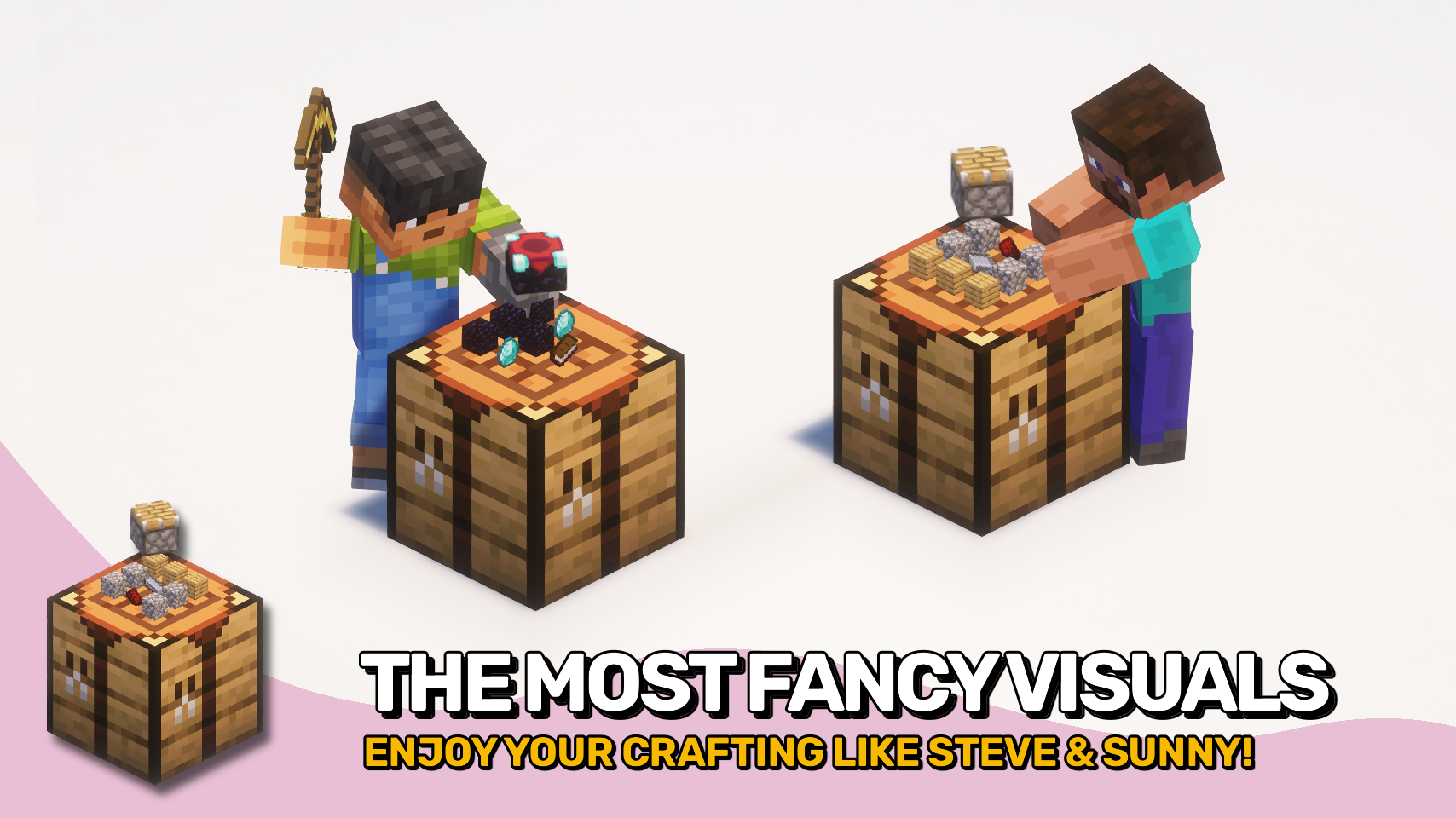
Visual Workbench 让合成台更具生机:在工作时,物品会保留在合成网格中。? 再也不用担心材料消失。所有物品保持可见且井然有序。
如果你破坏该方块,所有内容物会像预期那样掉落至地面。? 合成材料与成品也会直接渲染在方块上方,为合成台带来整洁而令人满意的视觉效果。
简单直观,是对熟悉方块的出色视觉升级。✨


⏩ 客户端必须安装 & 服务端必需
⏩ 需要安装 PUZZLES LIB(Fabric 与 NeoForge 版本)
⏩ 需要安装 FABRIC API(Fabric 版本)
⏩ 需要安装 FORGE CONFIG API PORT(Fabric 版本)

如果模组支持配置,可以通过游戏内模组菜单直接进行配置(Fabric 版本需安装由 Prospector 开发的 Mod Menu)。
如需使用外部文本编辑器手动配置,所有文件均位于 .minecraft/config 目录下,根据配置类型命名为 MOD_ID-client.toml、MOD_ID-common.toml 或 MOD_ID-server.toml。并非所有类型的配置文件都会存在,具体取决于模组。

? 感谢 Prototik 提供了原始创意以及其 RealBench 模组中的大部分渲染代码。
? 感谢 Tfarecnim 提供了其 Crafting Station 模组中 Just Enough Items 插件的代码。
? 感谢 Fabric Discord 中的 Daomephsta 指引我找到在 Fabric 上支持自定义合成台的正确方向。
 |
 |
|
 |
 |
|
 |
 |
|
 |
 |
|
 |
 |

© 2026 @heyitsfuzs. 保留所有权利。本页面最后编辑时间为 2026 年 9 月 11 日 06:44 (UTC)。
Visual Workbench makes crafting tables feel more alive by keeping items inside the grid while you work. ? No more disappearing ingredients. Everything stays visible and organized as you craft.
If you break the block, all contents drop on the ground just as you would expect. ? Crafting ingredients and the resulting item are also rendered directly on top, giving the table a clean and satisfying visual touch.
Simple, intuitive, and a nice visual upgrade to a familiar block. ✨
⏩ INSTALLATION REQUIRED ON CLIENT & REQUIRED ON SERVER
⏩ REQUIRES PUZZLES LIB TO BE INSTALLED (FABRIC & NEOFORGE)
⏩ REQUIRES FABRIC API TO BE INSTALLED (FABRIC)
⏩ REQUIRES FORGE CONFIG API PORT TO BE INSTALLED (FABRIC)
If available for a mod, configuration is possible directly from in-game using the mod menu (requires Mod Menu by Prospector to be installed on Fabric).
For manual configuration using an external text editor all files are found at .minecraft/config, named as MOD_ID-client.toml, MOD_ID-common.toml, or MOD_ID-server.toml, depending on the type of config. Not all types might exist for a mod, if any at all.
? Thanks to Prototik for the original idea and most of the rendering code from their RealBench mod.
? Thanks to Tfarecnim for the Just Enough Items plugin code from their Crafting Station mod.
? Thanks to Daomephsta from the Fabric Discord for pointing me into the right direction for supporting modded crafting tables on Fabric.
|
|
|
|
|
|
|
|
|
|
|
|
|
|
© 2026 @heyitsfuzs. All rights reserved. This page was last edited on 11 September 2026, at 06:44 (UTC).

下载 Visual Workbench
下载 Visual Workbench
下载 Visual Workbench
下载 Visual Workbench
下载 Visual Workbench
下载 Visual Workbench
下载 Visual Workbench
下载 Visual Workbench
下载 Visual Workbench
需要联机服务器吗?
稳定流畅、一键部署,几分钟即可和朋友联机开服
最低仅需 8 元/月 即可畅快联机
下载 Visual Workbench
更新日志
本项目的所有重要更改都将记录在此文件中。
格式遵循 Keep a Changelog, 并且本项目遵守 语义化版本控制。
[v26.3.0-mc26.3.x] - 2026-09-23
已更改
- 更新至 Minecraft 26.3.x
关于这个资源的讨论、问题反馈与使用心得
还没有讨论,来发第一帖吧
你是这个资源的作者?登录后可认领此资源。
相似资源
 模组

显示你正在注视的方块的信息。(适用于 Minecraft 1.16+ 的 Hwyla/Waila 分支)
 模组

查看物品与配方
 模组
在游戏画面角落显示附近世界地形、玩家、生物和实体的地图。可创建路径点,帮助你找到标记过的位置。
 模组
使用 JavaScript 编辑配方、添加自定义物品、编写世界事件!
 模组
添加区块认领和玩家组队功能,并与 Xaero's Minimap 和 World Map 集成
 模组
添加全屏世界地图,显示你在世界中已探索的区域。与 Xaero's Minimap 搭配使用效果极佳。
评论 0
登录后参与评分
还没有评论,来抢沙发吧