



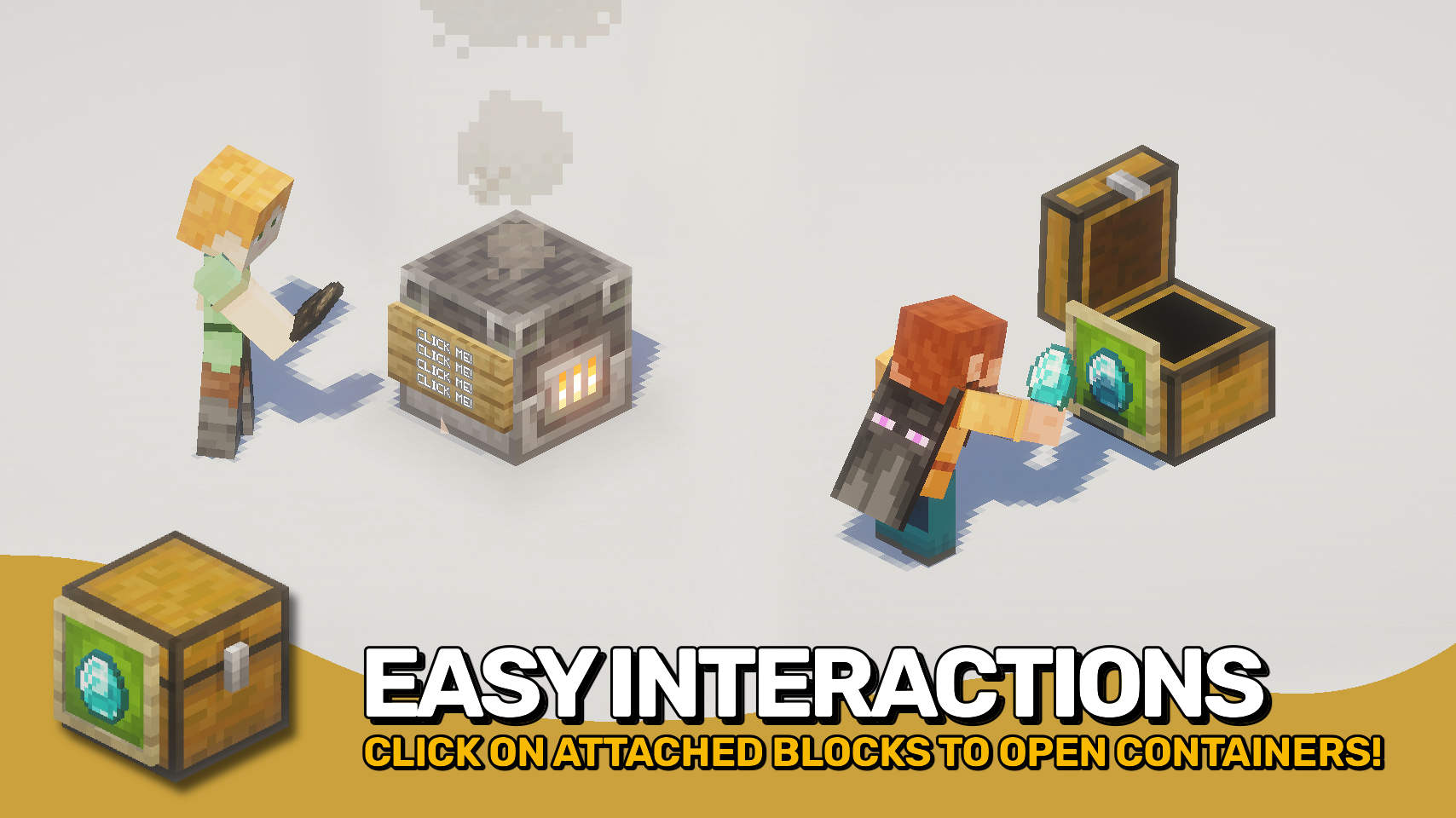
Reach Behind 让你能够与隐藏在装饰物(如物品展示框、告示牌、旗帜以及其他支持的附属块)背后的可用方块进行交互。无需绕开你放置的装饰物,即可打开箱子、使用工作台或访问其他方块。?️
该模组通过消除常见的挫败感来源,同时保留正常的装饰交互体验,使带有装饰的建筑更加实用。可选的空手模式有助于防止误操作编辑、物品放置及其他不需要的交互。?
它在单人游戏、专用服务器中均可运行,即使服务器未安装该模组,多人游戏也能正常工作。为了获得最完整且一致的体验,建议在客户端和服务器端都安装此模组。?

- ?️ 穿透装饰点击: 可以与物品展示框、发光物品展示框、告示牌和旗帜背后的可用方块进行交互。
- ? 更便捷的隐藏存储: 无需围绕装饰块或实体点击,即可直接打开连接的容器(如箱子)。
- ?️ 支持功能型方块: 即使被支持的装饰物覆盖,依然可以使用箱子、工作台和其他交互方块。
- ? 灵活的客户端与服务端用法: 适用于单人游戏、服务端多人游戏以及仅客户端安装的多人游戏(后者在服务端功能上有所限制)。
- ? 双端安装效果最佳: 当在客户端和服务端均安装时,所有玩家的交互体验将保持一致。
- ✋ 空手安全选项: 可选择要求手持空手以保留正常的装饰交互,例如向告示牌添加物品。
- ⚙️ 可自定义的支持列表: 配置哪些附属块和实体允许点击穿透。
- ? 模组兼容挂钩: 包含对兼容模组的支持,例如在存在时支持 Fast Item Frames。


⏩ 客户端可选安装 & 服务端可选安装
⏩ 需要安装 PUZZLES LIB(适用于 Fabric & NeoForge)
⏩ 需要安装 FABRIC API(适用于 Fabric)
⏩ 需要安装 FORGE CONFIG API PORT(适用于 Fabric)

如果模组支持配置,可以通过游戏内模组菜单直接进行配置(Fabric 端需要安装由 Prospector 开发的 Mod Menu)。
若使用外部文本编辑器手动配置,所有文件均位于 .minecraft/config 目录下,文件名分别为 MOD_ID-client.toml、MOD_ID-common.toml 或 MOD_ID-server.toml,具体取决于配置类型。并非所有类型的配置文件都会存在,甚至可能完全没有。
 |
 |
|
 |
 |
|
 |
 |
|
 |
 |
|
 |
 |

© 2026 @heyitsfuzs。保留所有权利。本页面最后编辑时间为 2026 年 9 月 11 日 06:44 (UTC)。
Reach Behind lets you interact with usable blocks hidden behind decorations such as item frames, signs, banners, and other supported attachments. Open a chest, use a crafting table, or access other blocks without needing to aim around the decorations you've placed. ?️
The mod makes decorated builds more practical by removing a common source of frustration while preserving normal decoration interactions. An optional empty hand mode helps prevent accidental edits, item placement, and other unwanted interactions. ?
It works in singleplayer, on dedicated servers, and even in multiplayer when the server does not have the mod installed. For the most complete and consistent experience, install the mod on both client and server. ?
- ?️ Click Through Decorations: Interact with usable blocks behind item frames, glow item frames, signs, and banners.
- ? Easier Hidden Storage: Open attached containers like chests without needing to click around decorative blocks or entities.
- ?️ Works With Functional Blocks: Use chests, crafting tables and other interactive blocks even when covered by supported decorations.
- ? Flexible Client and Server Use: Works in singleplayer, server-side multiplayer, and client-only multiplayer with server-side limitations.
- ? Best With Both Sides Installed: When installed on both client and server, interactions are handled consistently for all players.
- ✋ Empty-Hand Safety Option: Optionally require an empty hand to help preserve normal decoration interactions such as applying items to signs.
- ⚙️ Customisable Support Lists: Configure which attached blocks and entities allow clicks to pass through.
- ? Modded Compatibility Hooks: Includes support for compatible mods, such as Fast Item Frames, when present.
⏩ INSTALLATION OPTIONAL ON CLIENT & OPTIONAL ON SERVER
⏩ REQUIRES PUZZLES LIB TO BE INSTALLED (FABRIC & NEOFORGE)
⏩ REQUIRES FABRIC API TO BE INSTALLED (FABRIC)
⏩ REQUIRES FORGE CONFIG API PORT TO BE INSTALLED (FABRIC)
If available for a mod, configuration is possible directly from in-game using the mod menu (requires Mod Menu by Prospector to be installed on Fabric).
For manual configuration using an external text editor all files are found at .minecraft/config, named as MOD_ID-client.toml, MOD_ID-common.toml, or MOD_ID-server.toml, depending on the type of config. Not all types might exist for a mod, if any at all.
|
|
|
|
|
|
|
|
|
|
|
|
|
|
© 2026 @heyitsfuzs. All rights reserved. This page was last edited on 11 September 2026, at 06:44 (UTC).

下载 Reach Behind
下载 Reach Behind
下载 Reach Behind
下载 Reach Behind
下载 Reach Behind
下载 Reach Behind
需要联机服务器吗?
稳定流畅、一键部署,几分钟即可和朋友联机开服
最低仅需 8 元/月 即可畅快联机
下载 Reach Behind
下载 Reach Behind
下载 Reach Behind
下载 Reach Behind
更新日志
本项目的所有重要更改都将记录在此文件中。
格式遵循 Keep a Changelog, 并且本项目遵守 语义化版本控制。
[v26.3.0-mc26.3.x] - 2026-09-23
已更改
- 更新至 Minecraft 26.3.x
关于这个资源的讨论、问题反馈与使用心得
还没有讨论,来发第一帖吧
你是这个资源的作者?登录后可认领此资源。
相似资源
 模组

显示你正在注视的方块的信息。(适用于 Minecraft 1.16+ 的 Hwyla/Waila 分支)
 模组
在游戏画面角落显示附近世界地形、玩家、生物和实体的地图。可创建路径点,帮助你找到标记过的位置。
 模组
使用 JavaScript 编辑配方、添加自定义物品、编写世界事件!
 模组

查看物品与配方
 模组
AE2:一款流行的自动化与存储模组
 模组
那是什么?一个 Waila/Hwyla 的分支。
评论 0
登录后参与评分
还没有评论,来抢沙发吧